
The biggest bottleneck in data collection today isn't the backend infrastructure—it's user friction.
Whether you are capturing leads, running a startup waitlist, or collecting customer feedback, sending a user to a standalone URL with a long, scrolling form almost guarantees a massive drop-off rate, especially on mobile devices.
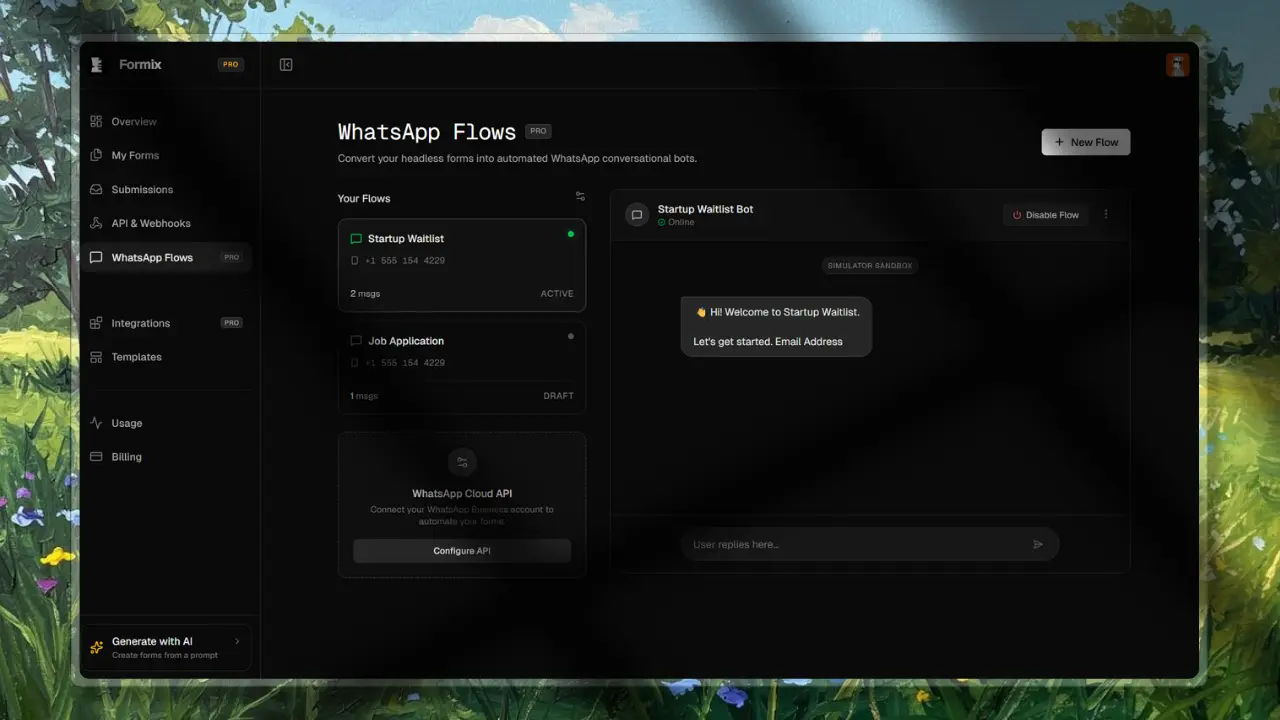
Today, we are thrilled to introduce WhatsApp Flows in Formix. This feature bridges the gap between our robust headless architecture and the world’s most popular messaging app.
Why WhatsApp?
Users live in chat apps. When you force a user out of their native environment (like Instagram, Twitter, or a direct message) into a browser to fill out a 10-field form, you lose them.
By bringing the form directly into WhatsApp, the interaction transforms from a "chore" into a "conversation". The data collection happens asynchronously. A user can answer two questions, put their phone down, and complete the rest later without losing their session state.
How It Works Under the Hood
Formix is built on a strictly headless architecture. Every form you create using our AI engine generates a structured JSON schema.
When you enable WhatsApp Flows, our engine acts as a middleware translator between the Meta Cloud API and your Formix JSON schema. Here is the lifecycle of a WhatsApp submission:
- Webhook Interception: When a user messages your connected WhatsApp Business number, Meta fires a webhook to our Next.js edge endpoint.
- Session State Management: We check our Neon database (
whatsapp_sessionstable) to see if this phone number has an active session. If not, we initialize one. - Schema Parsing: We read your form's JSON schema, identify the
currentStep, and format the next question as a WhatsApp text or interactive message. - Data Aggregation: As the user replies, we aggregate the data into a JSON object.
- Completion & Triggers: Once the final schema field is fulfilled, we securely commit the payload to the
submissionstable and instantly fire off your configured integrations (Slack, Discord, Zapier).
Handling State in Serverless
One of the biggest engineering challenges was managing conversational state in a stateless, serverless Next.js environment. We achieved this by treating our Postgres database (via Drizzle ORM) as the source of truth for the conversation pointer.
Here is a simplified look at how we process the incoming Meta webhooks:
// api/whatsapp/webhook/route.ts (Simplified)
import { db } from "@/db";
import { whatsappSessions } from "@/db/schema";
import { eq, and } from "drizzle-orm";

export async function POST(req: Request) {
  const body = await req.json();
  const message = body.entry[0].changes[0].value.messages[0];
  const fromNumber = message.from;
  const msgBody = message.text.body;

  // 1. Fetch active session
  const activeSession = await db.query.whatsappSessions.findFirst({
    where: and(
      eq(whatsappSessions.userPhoneNumber, fromNumber),
      eq(whatsappSessions.status, "active"),
    ),
  });

  if (activeSession) {
    // 2. Append data & increment pointer
    const currentStep = activeSession.currentStep;
    const updatedData = {
      ...(activeSession.collectedData as Record<string, any>),
      [currentStep]: msgBody,
    };

    await db
      .update(whatsappSessions)
      .set({
        currentStep: currentStep + 1,
        collectedData: updatedData,
      })
      .where(eq(whatsappSessions.id, activeSession.id));

    // 3. Send next question via Meta API
    await sendNextQuestion(activeSession.formId, currentStep + 1, fromNumber);
  }

  return new Response("EVENT_RECEIVED", { status: 200 });
}
Security and Scale
Because WhatsApp endpoints are public and hit frequently by Meta's servers, we needed to ensure our infrastructure wouldn't buckle under spam or DDoS attacks.
- Webhook Verification: Every incoming request is strictly verified using the
verifyTokengenerated during your setup. - Rate Limiting: We utilize
Upstash Redisto apply sliding-window rate limits per IP and phone number. - Encryption: Your Meta Access Tokens are encrypted at rest using
aes-256-gcmbefore being saved to the database.
Get Started
WhatsApp Flows are available today for all Pro plan users. To get started, head over to the WhatsApp Flows tab in your dashboard, connect your Meta API credentials, and toggle any of your active forms to "Online".
Stop losing users to clunky form UIs. Start collecting data where your users already are.